Halloween Designer: Elevating Your Creations with Modern, Thin Typography
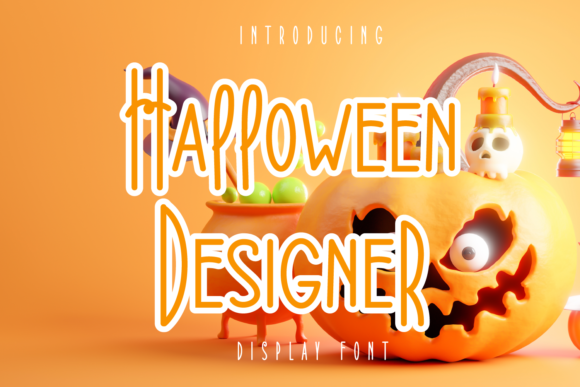
When you are designing for Halloween, the temptation is often to reach for the spookiest, most chaotic fonts available. Think dripping blood, jagged edges, or classic gothic blackletter. While those choices have their place, there is a growing trend toward sophistication in seasonal design. Enter Halloween Designer, a thin-lettered and modern display font that offers a sleek alternative to the traditional horror aesthetic. It is not just about being scary; it is about being stylish, memorable, and visually striking without relying on clichés.
This typeface stands out because it bridges the gap between eerie atmosphere and contemporary elegance. Its slender strokes create a sense of lightness and airiness, which can make even the darkest themes feel approachable and high-end. If you are looking to add a unique flair to your projects, understanding how to leverage this specific font can transform your work from amateurish to professional. Let’s explore where this font fits best and why it might be the missing piece in your creative toolkit.
Why Choose a Thin Display Font for Seasonal Projects?
In a world saturated with visual noise, standing out requires subtlety. Thick, bold fonts demand attention through volume, but thin fonts like Halloween Designer command attention through precision. The "display" nature of this font means it is designed to be read at large sizes, making it perfect for headlines, posters, and digital banners. However, its thin weight allows it to weave into designs rather than overpower them.
The primary advantage here is versatility. Because it is modern and clean, it avoids the dated look that some ornate horror fonts can carry. This makes it suitable for audiences who appreciate design quality over shock value. Whether you are targeting a younger demographic that prefers minimalist aesthetics or a more mature audience looking for upscale event invitations, Halloween Designer provides a neutral yet thematic foundation.
Real-World Applications Across Different Sectors
One of the strongest arguments for using Halloween Designer is its adaptability across various industries. It is not limited to just one type of project. Here is how different professionals can integrate this font into their workflows effectively.
For Marketers and Small Business Owners
If you run a small business, especially in retail, hospitality, or entertainment, your Halloween marketing needs to balance festivity with brand identity. A bakery selling themed cupcakes, a boutique hosting a trunk-or-treat event, or a local bar offering special cocktails all need promotional materials that look cohesive. Using a overly aggressive font might clash with a brand’s established voice. Halloween Designer allows these businesses to participate in the holiday spirit while maintaining a level of class. Imagine a minimalist poster for a wine tasting event during October; the thin, elegant lines of the font complement the product perfectly.
For Educators and Content Creators
Educators often struggle to find resources that are age-appropriate yet engaging. For older students or college-level courses discussing cultural history, folklore, or even typography itself, Halloween Designer serves as an excellent tool. It can be used in slide decks, handouts, or digital assignments to mark seasonal themes without distracting from the educational content. Similarly, bloggers and YouTubers creating content about DIY decorations, costume tutorials, or seasonal recipes can use this font for thumbnails and titles. It signals to the viewer that the content is well-produced and curated.
For Freelancers and Graphic Designers
Freelancers are always looking for ways to differentiate themselves. Offering clients a modern take on seasonal design can be a unique selling point. When pitching a rebrand or a seasonal campaign, showing a mockup that uses Halloween Designer demonstrates an understanding of current design trends. It shows that you are not just copying what everyone else is doing. Furthermore, because it is a display font, it pairs exceptionally well with simple sans-serif body text, allowing designers to create clear hierarchy in their layouts.
Scenario-Based Use Cases
To truly understand the utility of Halloween Designer, consider these specific scenarios:
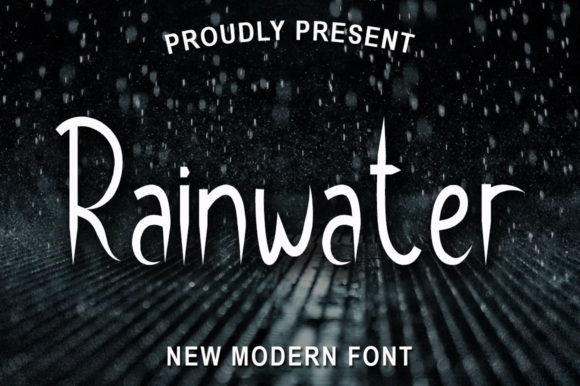
- Event Invitations: You are organizing a corporate Halloween party or a sophisticated house party. You want the invitation to feel exclusive. A dark background with thin, white lettering in Halloween Designer creates a stark, elegant contrast that feels expensive.
- Social Media Campaigns: An influencer is launching a series of posts about autumn fashion. They need a font that looks good on Instagram stories and Pinterest pins. The thin lines scale well on mobile devices and do not get pixelated or cluttered when overlaid on photos.
- Product Packaging: A small batch producer of candles or soaps wants to release a limited edition "Spooky Season" scent. Instead of a generic label, they use Halloween Designer for the product name. It sits quietly on the shelf, inviting curiosity rather than shouting for attention.
What Users Should Consider Before Using Halloween Designer
While Halloween Designer is a powerful tool, it is not a one-size-fits-all solution. There are practical considerations to keep in mind before you download and start applying it to your projects.
Legibility and Scale
As a thin display font, readability can become an issue if the text is too small. Do not attempt to use Halloween Designer for body copy or long paragraphs. It is designed for impact at larger sizes. If you need to convey detailed information, pair it with a highly readable sans-serif or serif font. Always test your design at the actual size it will be displayed. What looks crisp on a 4K monitor might become illegible when printed on a small flyer.
Kerning and Spacing
Thin fonts often require more generous spacing to breathe. Tight kerning (the space between letters) can make thin strokes merge together, creating a muddy appearance. When using Halloween Designer, give your letters room to stand alone. Wide tracking can enhance the modern, airy feel of the typeface, reinforcing the sophisticated vibe you are aiming for.
Licensing and Usage Rights
Before incorporating any font into commercial projects, always verify the license. Some fonts are free for personal use only, while others require a commercial license for business applications. Understanding these terms protects you from legal issues and ensures that your use of Halloween Designer is ethical and compliant. Check the source where you obtain the font for clear guidelines on printing limits, digital usage, and redistribution.
Connecting Features to Outcomes
The ultimate goal of using Halloween Designer is to improve the perception of your work. By choosing a modern, thin lettered font, you signal to your audience that you pay attention to detail. You are suggesting that your project is thoughtful and refined. This subtle shift in tone can lead to higher engagement rates, better conversion for marketing materials, and a stronger overall brand presence.
It is important to remember that design is about communication. Halloween Designer communicates elegance, mystery, and modernity. When these qualities align with your message, the result is a harmonious design that resonates with viewers. Whether you are a hobbyist crafting a greeting card or a marketer launching a nationwide campaign, this font offers a versatile solution that elevates the mundane into the extraordinary.
So, add Halloween Designer to your creative ideas. Notice how it changes the mood of your layout. Experiment with contrasting colors, play with negative space, and let the thin lines guide the eye. In a season often dominated by loud and chaotic visuals, sometimes the quietest voice is the one that gets heard the loudest.