Merton: Navigating the Whimsical World of Vintage Display Typography
Selecting the right typeface is rarely just about picking something that looks nice. It is a strategic decision that influences readability, brand perception, and user engagement. When you encounter Merton, a cool, vintage-styled, and assertive display font, it is easy to be drawn in by its modern yet whimsical charm. However, beneath its magical aesthetic lies a set of specific use cases and technical considerations that many designers overlook. Understanding these nuances is essential for ensuring your designs do not just look good on a screen but function effectively in the real world.
Understanding the Merton Aesthetic
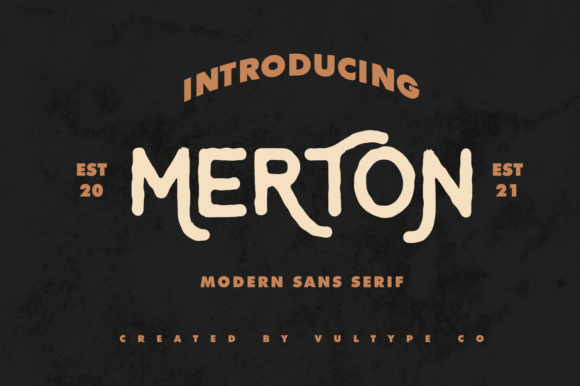
Merton is not a body text font. Its character lies in its ability to command attention through a blend of retro elegance and contemporary playfulness. The "assertive" nature of the font means it carries weight; it does not whisper, it speaks. This makes it an excellent choice for headlines, logos, posters, and packaging where immediate visual impact is required. The whimsical style adds a layer of approachability, suggesting creativity and personality rather than rigid corporate formality.
Many creators are interested in Merton because it bridges a gap between traditional serif sophistication and modern sans-serif minimalism. It offers a unique texture that can immerse your designs into a magical world without feeling dated. However, this very distinctiveness is also what leads to common misuse. Because it is so visually striking, there is a temptation to overuse it or apply it in contexts where subtlety is needed.
The Trap of Over-Application
One of the most frequent mistakes made with display fonts like Merton is using them for long-form content. Unlike neutral, highly legible typefaces designed for reading, Merton’s intricate details and stylistic flourishes can cause eye strain when used in paragraphs. If you attempt to set a blog post or a manual in Merton, you will likely find that readers disengage quickly. The font demands too much cognitive effort to decode, turning a simple reading experience into a chore.
To avoid this, always reserve Merton for short bursts of text. Use it for titles, subheadings, pull quotes, or button labels. When pairing Merton with other fonts, choose a clean, simple sans-serif or a straightforward serif for body copy. This contrast ensures that the whimsical nature of Merton remains a highlight rather than a distraction. For example, pairing Merton with a neutral geometric sans-serif creates a balanced hierarchy that guides the reader’s eye naturally from the exciting headline to the informative text below.
Evaluating Legibility and Context
Before downloading or purchasing Merton, it is crucial to evaluate its performance across different mediums. Display fonts often rely on high resolution and large sizes to show their true character. In small sizes, such as on mobile navigation menus or footers, the fine details of Merton may become muddy or illegible. This can negatively affect usability, particularly for users with visual impairments or those viewing your content on smaller devices.
Checklist for Evaluation:
- Size Testing: Render Merton at various sizes (e.g., 12px, 16px, 72px) to see where it loses clarity.
- Contrast Ratios: Ensure the font maintains sufficient contrast against its background. Vintage styles often have thinner strokes that can disappear on busy or light backgrounds.
- Screen vs. Print: Test the font in both digital and print environments. Some vintage textures render beautifully on paper but appear jagged on low-resolution screens.
Ignoring these checks can lead to professional embarrassment and reduced accessibility. A design that looks stunning in a mockup but fails to read clearly in production is a failed design. By proactively testing Merton in its intended environment, you ensure that the "magical world" it creates is inviting, not confusing.
Licensing and Commercial Use
Another area where creators often stumble is understanding licensing agreements. Fonts are intellectual property, and the terms of use for display fonts can vary significantly. Some licenses allow for web embedding, while others restrict usage to print only. Others may require additional fees for commercial projects involving merchandise or high-volume advertising.
It is vital to read the end-user license agreement (EULA) carefully. Assuming that a free download allows for unrestricted commercial use is a risky move that can lead to legal complications. Conversely, paying for a premium license without verifying if it covers your specific use case (such as app development or NFT creation) can result in wasted resources. Always confirm that the license includes the specific rights you need, whether that is desktop publishing, web font embedding, or broadcast usage.
Strategic Pairing and Hierarchy
Effective typography is about hierarchy. Merton’s assertive style should serve as the anchor of your typographic system, not the foundation. When designing a layout, establish a clear visual hierarchy where Merton acts as the primary focal point. Secondary information should be handled by more subdued typefaces that support rather than compete with the main message.
A common error is trying to pair Merton with another decorative or script font. This results in visual clutter and a lack of cohesion. Instead, let Merton shine by giving it space. Use ample white space around headings set in Merton to enhance its presence. This breathing room reinforces the premium, curated feel of the font and prevents the design from appearing chaotic.
Color and Texture Considerations
The whimsical nature of Merton interacts dynamically with color and texture. While black and white work well, experimenting with muted, earthy tones or pastel palettes can enhance the vintage vibe. However, be cautious with neon or overly bright colors, which can clash with the sophisticated undertones of the font. Similarly, adding heavy textures or grunge effects to the font itself can reduce legibility. Let the font’s inherent shape provide the character; additional embellishments are often unnecessary and can detract from the clean execution of the design.
Final Thoughts on Integration
Incorporating Merton into your workflow requires a balance of appreciation for its artistic qualities and discipline in its application. It is a tool for creating atmosphere and drawing attention, not for conveying dense information. By respecting its limitations and leveraging its strengths, you can create designs that are not only visually captivating but also functional and effective.
Take the time to experiment with pairings, test legibility across devices, and understand the licensing terms. These steps may seem tedious, but they are the difference between a design that merely looks cool and one that communicates successfully. When used correctly, Merton will undoubtedly immerse your audience in a memorable experience, elevating your project from ordinary to exceptional. Approach it with respect for its power, and it will reward you with designs that stand out in a crowded digital landscape.